Slovenčina
  Deutsch
  España
  Francais
  Polish
  Russian
  Čeština
  Greek
Greek  Romanian
  Arabic
  Português
  Indonesian
  Croatian
  Serbia
  Farsi
Farsi  Hebrew
  Mongolian
  Bulgarian
  Georgia
  Azerbaijani
  Thai
Thai  Turkish
  Magyar
 Improve functions


After changing constraints or adding new requirements, you may want to improve an already generated timetable. The recommended way is usually to generate a completely new timetable, because even a small change can significantly affect the overall timetable structure.
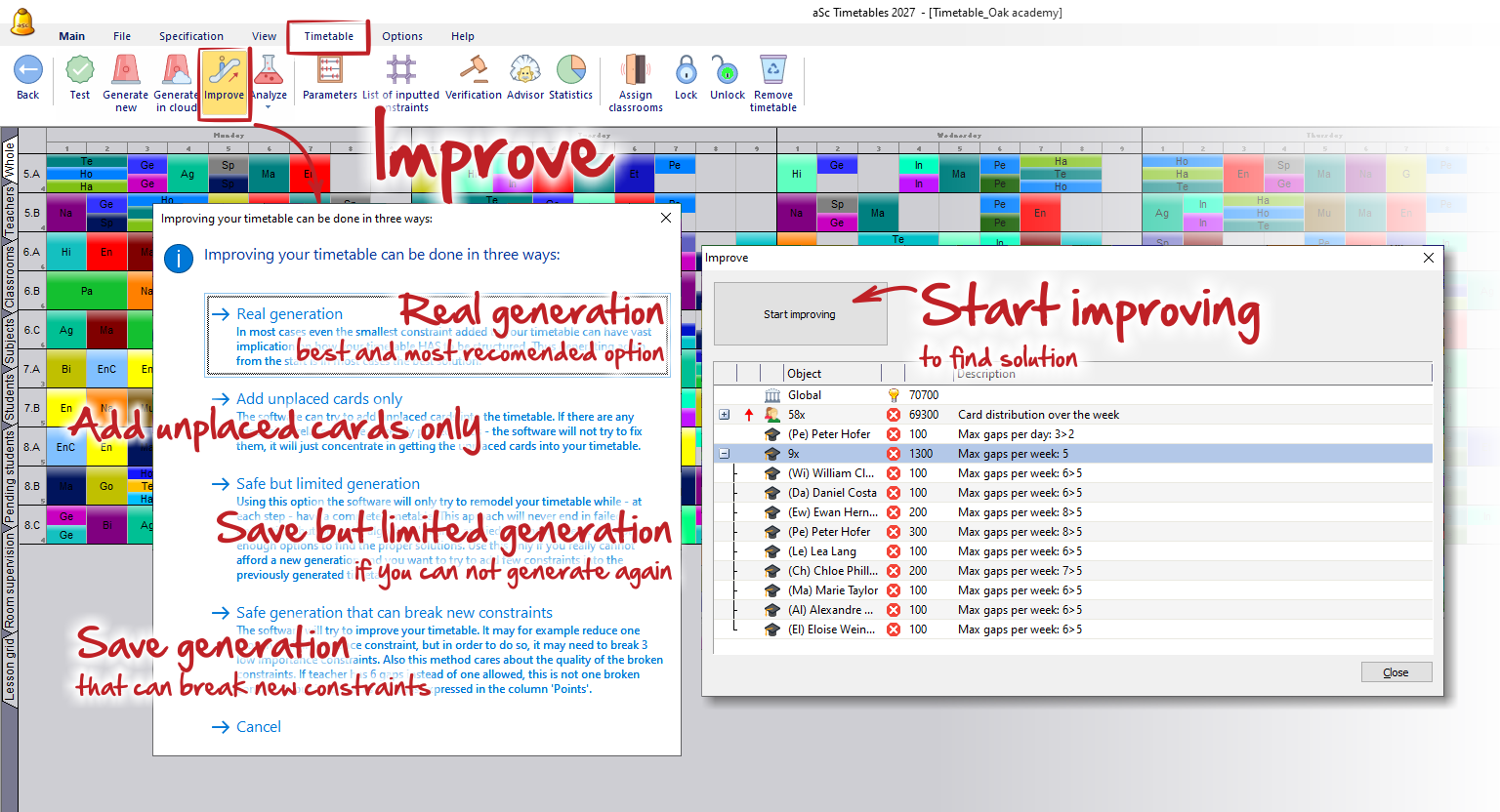
To improve an existing timetable, use Timetable → Improve. The dialog offers several options:
Real Generation
Creates a completely new timetable from scratch. This is the recommended option in most cases, as the generator can take all constraints into account from the very beginning and find the best overall solution.
Add Unplaced Cards Only
The software will only try to place lessons that are currently unplaced. Existing lessons will not be moved and already broken constraints will not be repaired.
Safe but Limited Generation
The software attempts to improve the current timetable while always keeping it complete. Since lessons are never removed from the timetable, the algorithm has fewer possibilities to explore alternative solutions. This option is useful when a full regeneration is not desirable.
Safe Generation That Can Break New Constraints
This mode tries to improve the timetable quality even if it needs to break some lower-priority constraints in order to satisfy more important ones. The software evaluates both the number and severity of broken constraints. The overall quality is reflected by the Points value shown in the dialog.
Notes:
- When should you use Improve? - If timetable generation normally takes only a few minutes, it is usually better to add the new constraints and perform a Real Generation. The success rate is significantly higher because the generator knows all requirements before placing the first lesson.
The improve functions are mainly intended for large and complex timetables where a complete regeneration may take a long time. In such cases, they allow you to test additional requirements or gradually improve the timetable without losing the current solution.
-The improve functions never remove lessons from the timetable. This means the timetable remains complete throughout the entire process, which is often convenient. However, this limitation also means that some problems cannot be solved without rebuilding larger parts of the timetable.
Therefore, Improve should be viewed as a tool for refining and polishing an existing timetable, not as a replacement for generating a new timetable. If significant changes are required or several constraints are broken, a new generation will usually produce better results.