Slovenčina
  Deutsch
  España
  Francais
  Polish
  Russian
  Čeština
  Greek
Greek  Romanian
  Arabic
  Português
  Indonesian
  Croatian
  Serbia
  Farsi
Farsi  Hebrew
  Mongolian
  Georgia
  Azerbaijani
  Thai
Thai  Turkish
  Magyar
 Relations - basic overview


In aSc Timetables you can add many constraints which are linked to each individual object - teacher, class, subject or classroom. For more precise outcomes in your timetable you can create card relationships which can be applied to more selected objects at once.
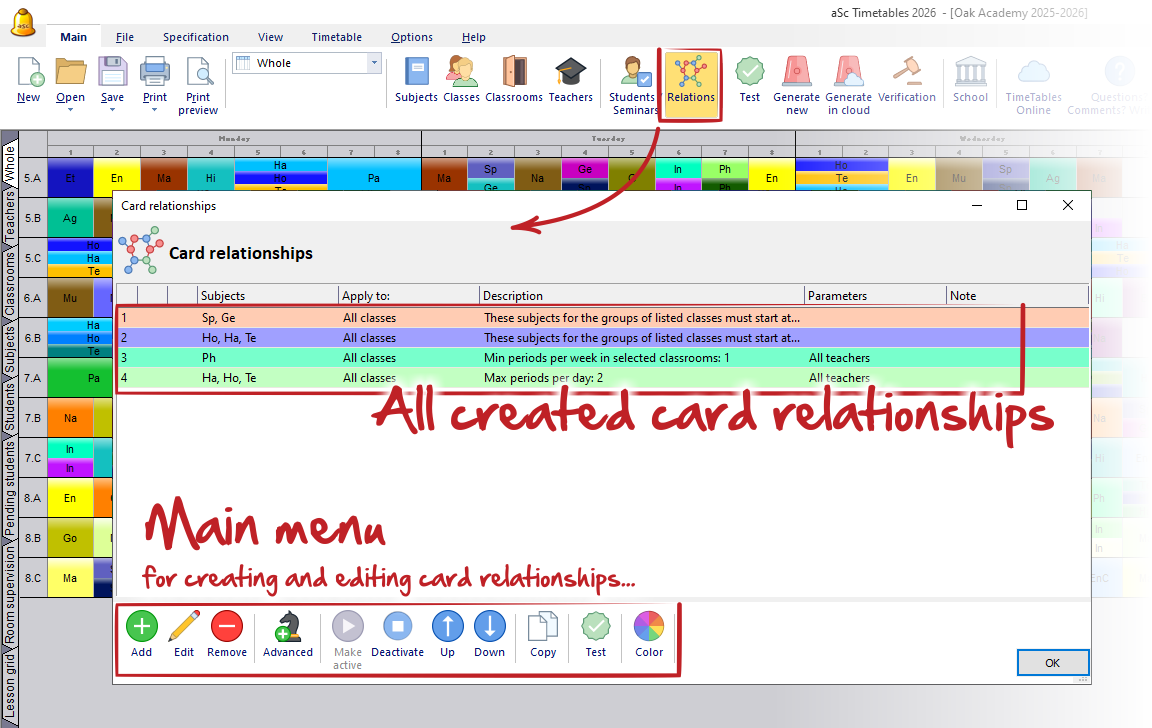
In menu Main, click on "Relations" icon. The new dialog appears.
The main menu contains buttons:
Add - Adds a new basic card relationship.
Edit - Edits the selected card relationship.
Remove - Removes the selected card relationship.
Advanced - Adds a new advanced card relationship.
Make active - Activates the selected card relationship.
Deactivate - Deactivates the active card relationship.
Up - Moves the selected card relationship up in the list.
Down - Moves the selected card relationship down in the list.
Copy - Creates a copy of the selected card relationship.
Test - Tests one or more selected card relationships.
Color - Changes or assigns a color to the card relationship.
OK Button - Confirms the changes and closes the window.