 Slovenčina
  Deutsch
  España
  Francais
  Polish
  Russian
  Čeština
  Greek
Greek  Romanian
  Arabic
  Português
  Indonesian
  Croatian
  Serbia
  Farsi
Farsi  Hebrew
  Mongolian
  Georgia
  Azerbaijani
  Thai
Thai  Turkish
  Magyar
 How to add basic card relationship


Basic card relationships can be added in Relations dialog by clicking on "Add" button. New dialog "New relationship" appears. It is divided into these main parts.
1. Click on "Select subjects" button. New dialog appears and you can select one or more subjects, you wish the new relation will be apply to. This option is mandatory, because with no selected subject the relation will basically do nothing.
2. Select if the relation will be applied to All classes or Selection of classes (click on "Change classes" buton and select classes in a similar way as subjects). Default option is for all classes.
3. Select the card relationship you wish to use. In some cases, there are additional settings or hidden fields appears after selecting the relation.
4. For every relation you can specify its Importance or activate/deactivate it.
Note:
As you can see, these "basic" relations try to solve most general situations related to classes and their lessons. Specific situations related to teachers, classrooms you can solve with advanced relations.
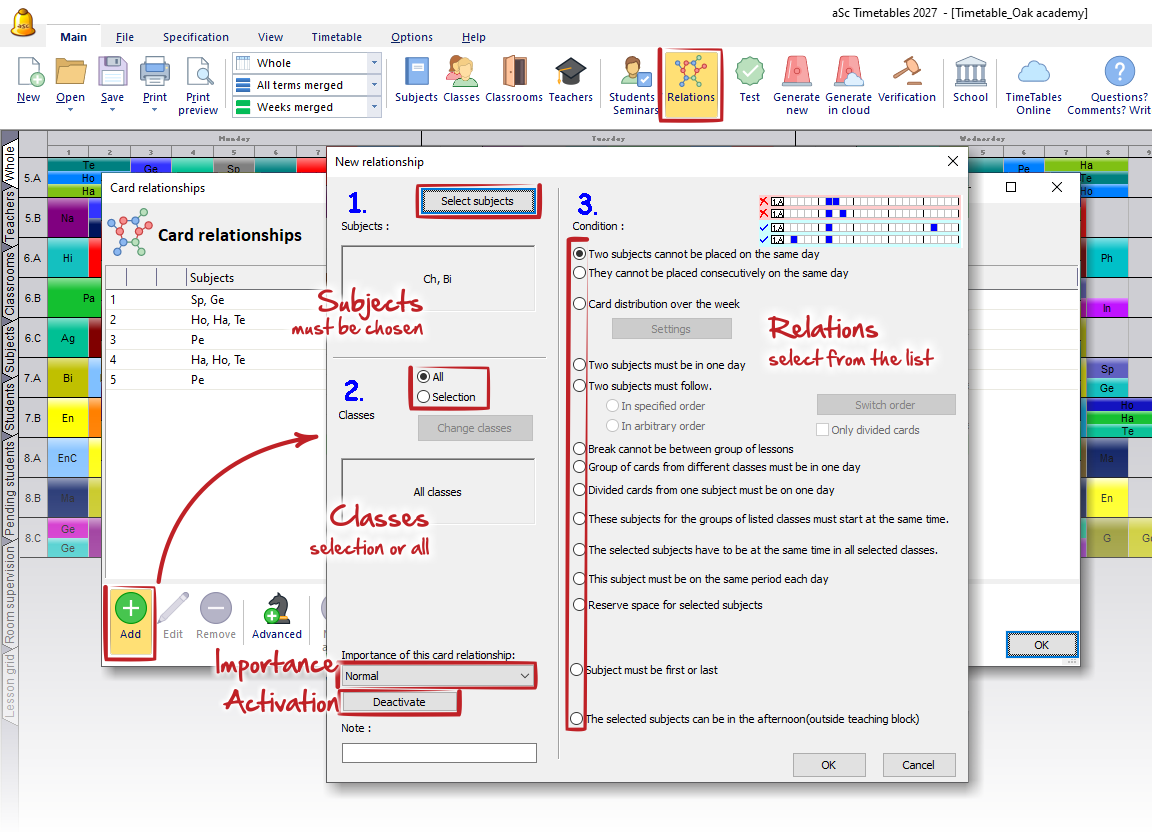
Here are some use cases for every relation you can select in the 3rd part:
- Two subjects cannot be placed on the same day.
- They cannot be placed consecutively on the same day.
Two subjects cannot follow/Cannot be on the same day. - card distribution over the week.
I want to have Single AND Double lessons of one subject! E.g 1+1+1+2
Specify how many lessons shall be before certain position
There can be two Math lessons on one day, but they need to be placed consecutively - Two subjects must be in one day.
- Two subjects must follow.
Two subjects must follow each other - Break cannot be between group of lessons.
- Group of cards from different classes must be in one day.
- Divided cards from one subject must be on one day.
- These subjects for the group of listed classes must start at the same time.
- The selected subjects have to be at the same time in all selected classes.
I need subject Math to be on the same position in classes 5.A and 5.B - This subjects must be on the same period each day.
I want to have Math lessons in a class on the same period every day - Reserve space for selected subjects.
- Subjects must be first or last.
I need subject Geography to be last lesson on a day in classes 5.A, 5.B, 5.C... - The selected subjects can be in the afternoon (outside teaching block).
How can I define lessons that can be outside teaching block(in the afternoon)?
In the last part you can specify the Importance of this relation, activate or deactivate it and add notes.