 Deutsch
  España
  Francais
  Polish
  Russian
  Čeština
  Greek
Greek  Romanian
  Arabic
  Português
  Indonesian
  Croatian
  Serbia
  Farsi
Farsi  Hebrew
  Mongolian
  Bulgarian
  Georgia
  Azerbaijani
  Thai
Thai  Turkish
  Magyar
 Different time-off in multi week timetable


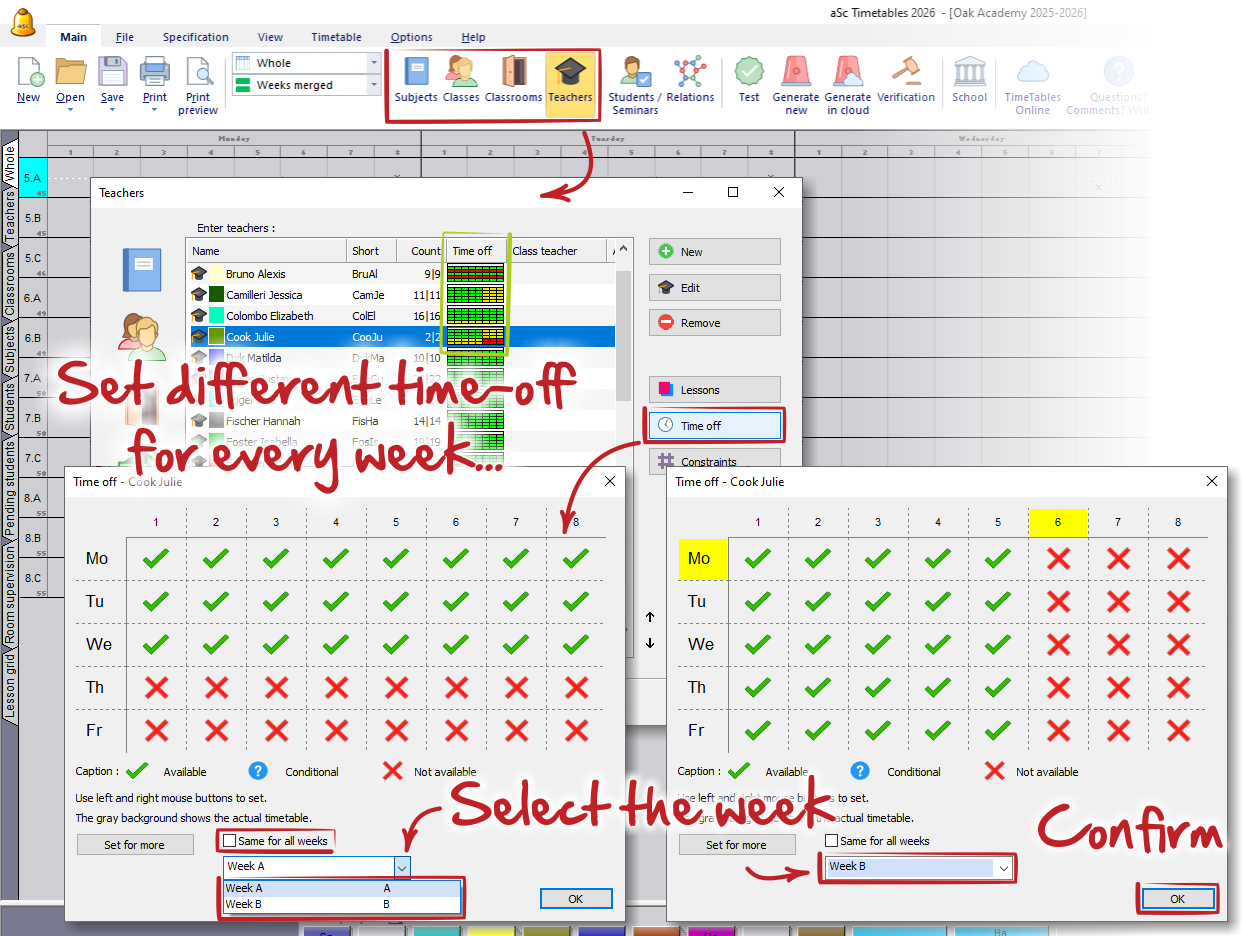
If your timetable contains multiple weeks/terms, you can specify different time-offs for each object (teacher, class, classroom, subject, or student) for every week or term.
Once you create a multi-week timetable, you will see the option "Same for all weeks/terms" in the time-off dialog. This option is selected by default for all objects.
If you want to specify different time-offs, first uncheck this checkbox. Then select the required week/term from the dropdown menu and specify the time-off as usual (separately for each week).
When finished, positions blocked only for some weeks will be highlighted in yellow. Positions blocked for all weeks/terms will be highlighted in red (not available) or blue (conditional).
See also:
How can I define weeks?
Time-off