 Deutsch
  España
  Francais
  Polish
  Russian
  Čeština
  Greek
Greek  Romanian
  Arabic
  Português
  Indonesian
  Croatian
  Serbia
  Farsi
Farsi  Hebrew
  Mongolian
  Georgia
  Azerbaijani
  Thai
Thai  Turkish
  Magyar
 How can I edit the timetable saved online


All your timetables you can find in Timetables administration. Please see: How can I get to Timetables online administration
There you can easily edit your last saved timetable (even from PC version of aSc Timetables software), or any other file.
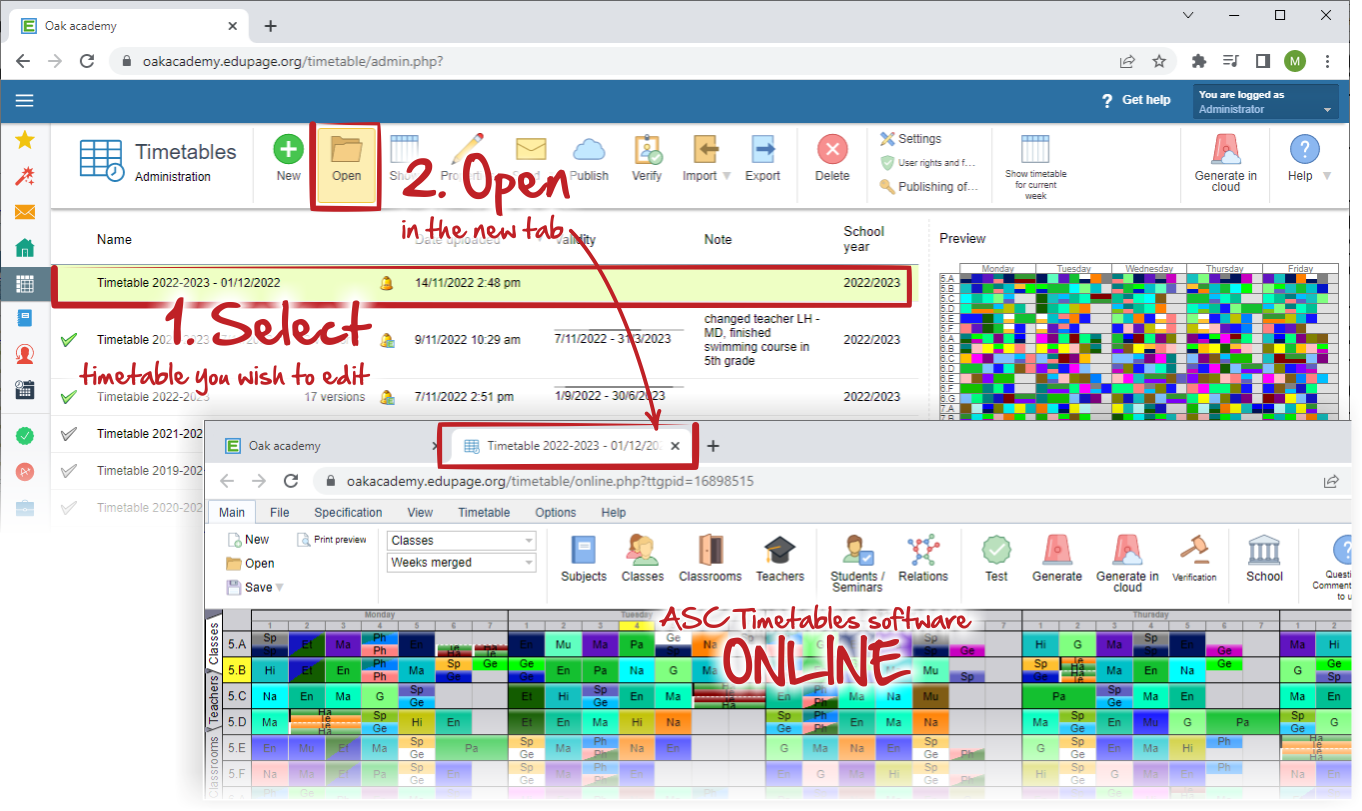
Select the timetable file and click "Open" button. Program opens the last official version of your timetable on the new tab. You can work on your file in the internet browser directly and no installation is necessary.
Note:
In case, that the official version is not the latest, the new dialog with versions will be opened and you can choose, which version you wish to open. Please, see this:
How to open previously saved versions of my timetable online