
 Slovenčina
  Deutsch
  Francais
  Čeština
  Romanian
  Arabic
  Português
  Indonesian
  Serbia
  Farsi
Farsi  Hebrew
  Mongolian
  Georgia
  Azerbaijani
  Thai
Thai  Turkish
  Magyar
 Printing different bell times for school sections/days
different bells


By default the software print the bell times bellow the period number in timetable headers.
In cases you have different bells in some parts of the school or on some days specified in periods-bell settings, then you can print these different bell time directly on the cards.
Just make right click on any card in the print preview and select that you want to print the Bell times on cards.
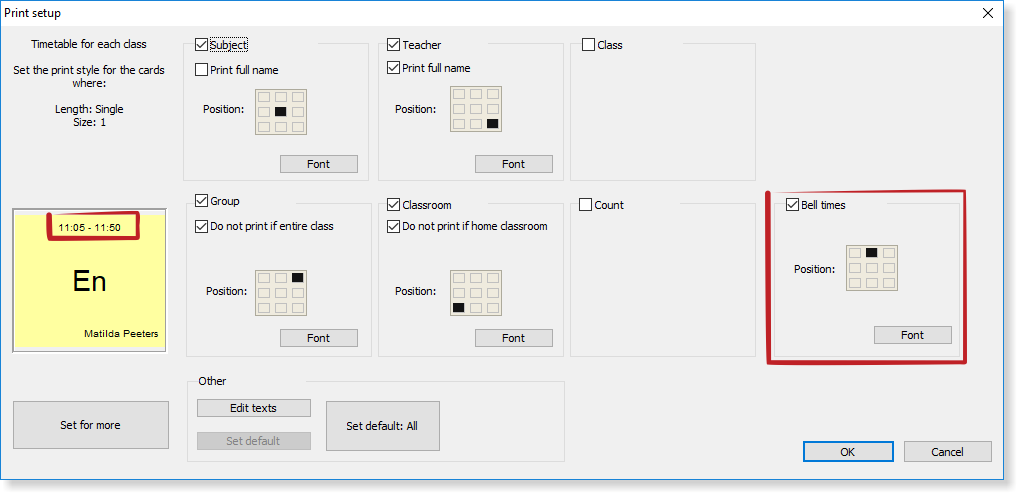
Note: This setting will not print bell times on EVERY card. Only if the lesson has different start or end than the values in the timetable header, the periods times are printed:
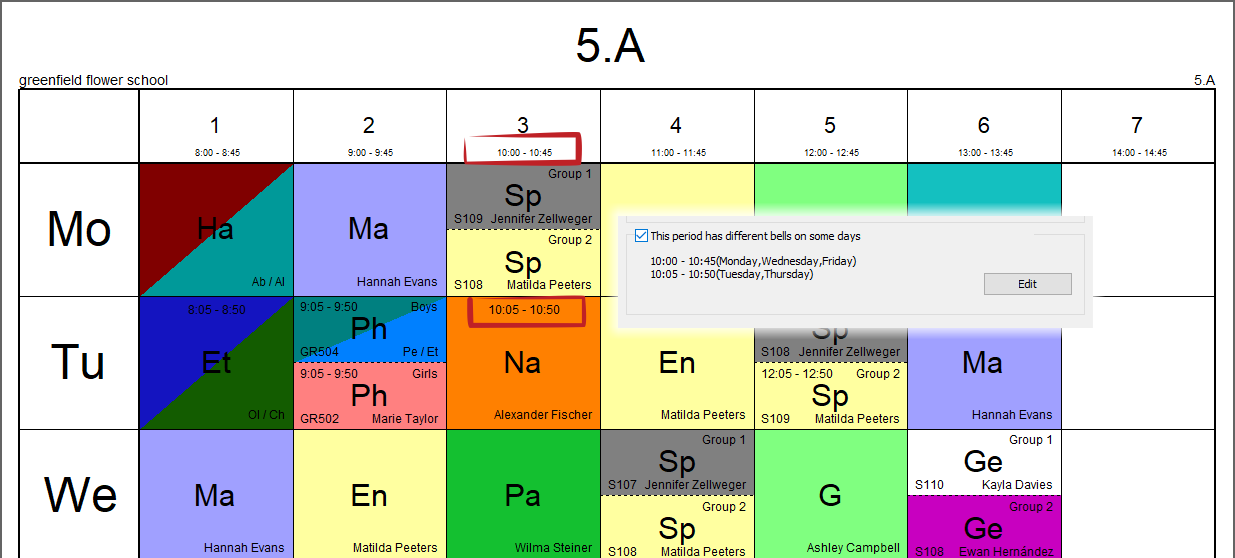
In class timetable, this can happen when there is different bell times on some day, in teacher's timetable this can happen when the teacher is teaching in school section with different bell times.
See also:
Do not print some breaks or periods in some classes (or teachers or in summary timetables)
We have different recess times in parts of school. How to input it? (Solution 2)
Print different bell times for teachers
We have different bells on some days.