 Francais
  Čeština
  Romanian
  Português
  Indonesian
  Croatian
  Serbia
  Farsi
Farsi  Hebrew
  Mongolian
  Georgia
  Azerbaijani
  Thai
Thai  Turkish
  Magyar
 We have 6 lessons each day but on Friday we have only 4


If you wish to finish your school earlier on some days, or you need to allow some day more periods than usual, you can simply use Time-off for classes and block all unnecessary periods.
Let's take a case, when you have 6 periods every day, but on Friday, you have only 4.
1. At first you need to set 6 periods per day for entire week (as max number) - see: Can I set the number of lessons per day?
2. Then you can block last two periods on Friday for the first class this way:
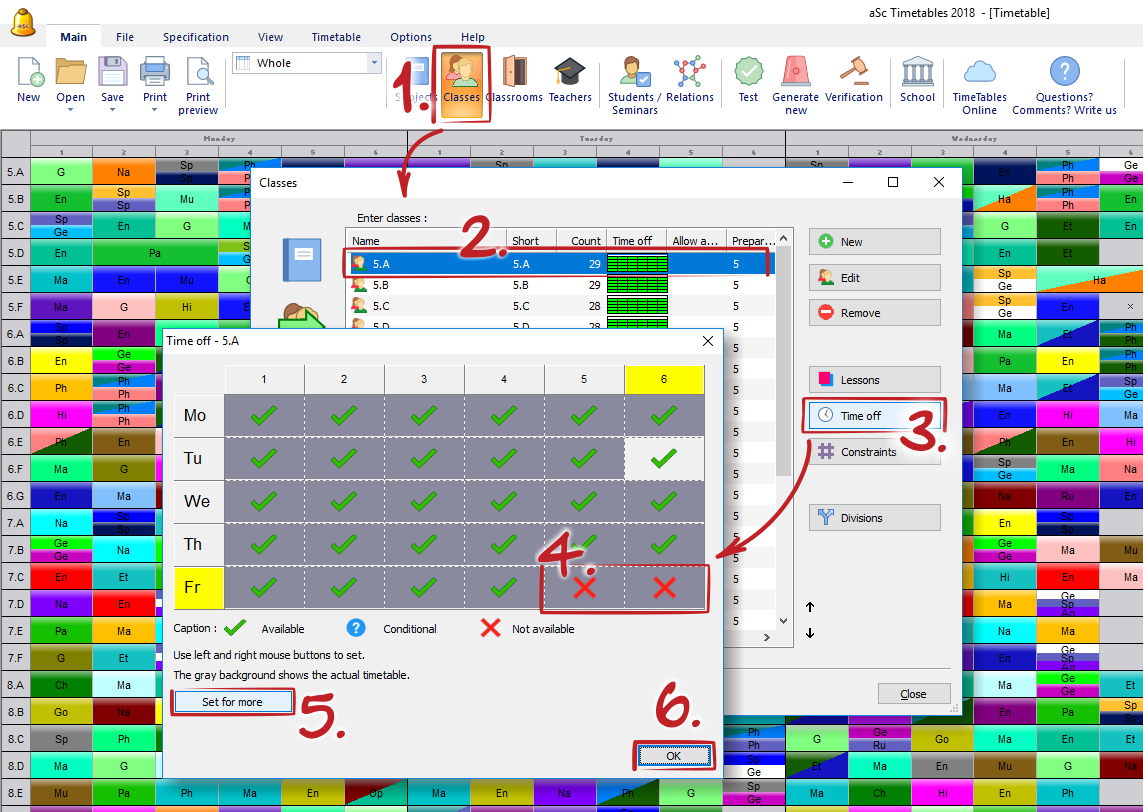
Then, use button "set to all" and copy this time-off setting to other /or all/ classes.
Note
- use this settings for classes time-offs always, and not just for teacher or classrooms.
- similar way can be used for a "longer day". E.g if you have 5 periods every day except Wednesday, when you have 7, then in first point set "7 periods per day" and then block all 6,7 periods you do not with to teach.
See also
Time-off