 Deutsch
  España
  Francais
  Polish
  Čeština
  Romanian
  Arabic
  Português
  Indonesian
  Croatian
  Serbia
  Farsi
Farsi  Hebrew
  Mongolian
  Georgia
  Azerbaijani
  Thai
Thai  Turkish
  Magyar
 How can I export room supervisions duties timetable?


Timetables OFFLINE software - You can export the generated supervisions into the XML file.
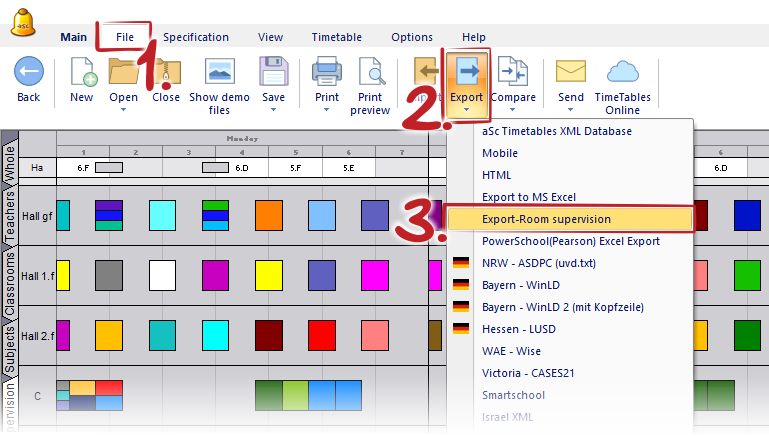
Use the menu "File - Export - Export Room supervisions". Then program asks you, if you wish to open the file directly in Excel (if it installed on your PC), or you wish to save the new file on your PC.
The basic layout of the export looks like follow:
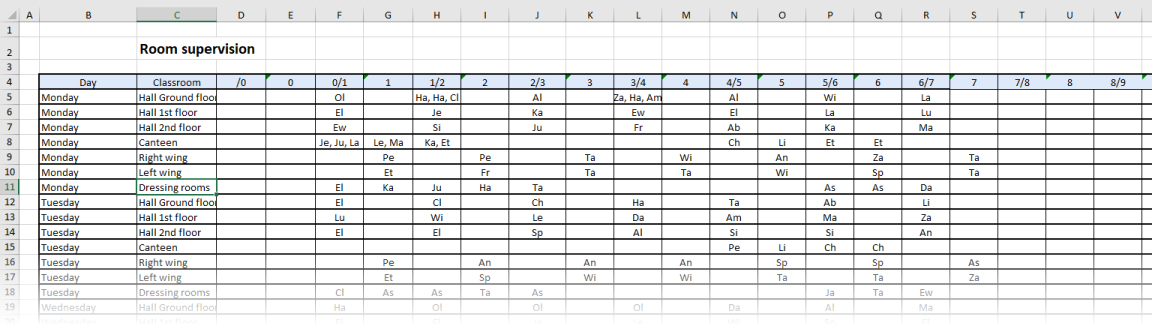
and the template for this export is located in:
"C:Timetables/template/excelexport/room_supervisions_template.xml"
If you wish, you can modify the template and save it under a new_nameroom_supervisions.xml - without the "_template" in the same directory. For the next exports the software will use your modified template. This feature is available only in the offline version for Windows.
Timetable ONLINE - you can export the generated supervisions directly into Excel XLSX file in a same layout.
See also:
How to print room supervision in teacher's and classroom's timetable?