 Deutsch
  España
  Francais
  Polish
  Russian
  Čeština
  Greek
Greek  Lithuania
  Romanian
  Arabic
  Português
  Indonesian
  Croatian
  Serbia
  Farsi
Farsi  Hebrew
  Mongolian
  Bulgarian
  Georgia
  Azerbaijani
  Thai
Thai  Turkish
  Magyar
 Enable teachers to borrow textbooks for themselves.


Select the “Settings” tab on the main screen.
To allow teachers to borrow textbooks for themselves, click the “Enable” button in the “Rights” group,
located under the “Teachers cannot borrow textbooks for themselves.” header.
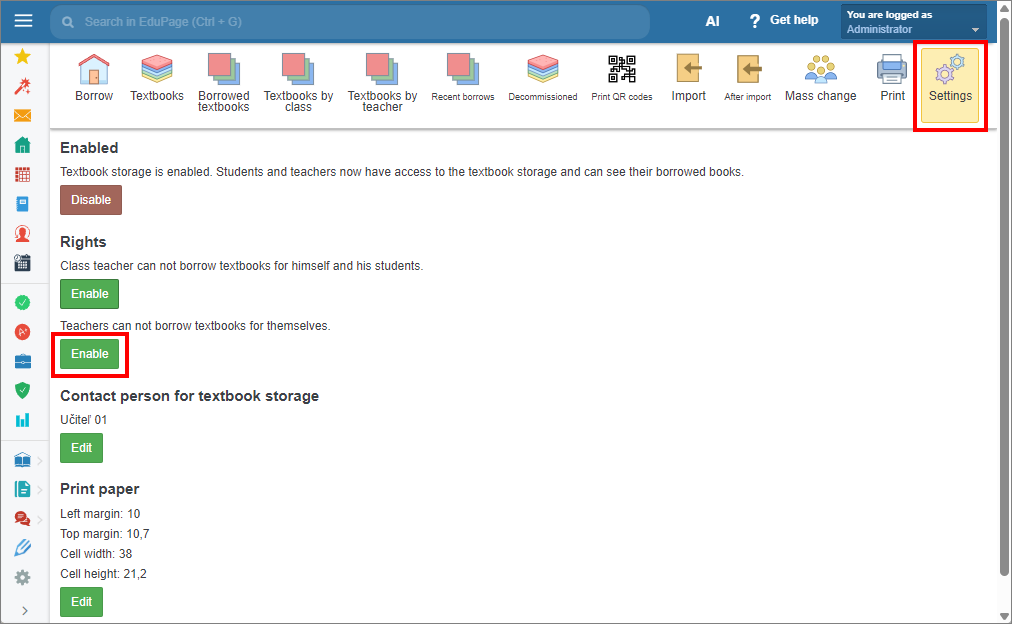
Click the corresponding button again to disable the feature.
See also:
How to assign administrator rights to the Textbook storage?
How to assign borrow/return textbooks rights to the Textbook storage?
Enable teachers to borrow textbooks for themselves and for their students.