 Deutsch
  España
  Francais
  Polish
  Russian
  Čeština
  Greek
Greek  Lithuania
  Romanian
  Arabic
  Português
  Indonesian
  Croatian
  Serbia
  Farsi
Farsi  Hebrew
  Mongolian
  Bulgarian
  Georgia
  Azerbaijani
  Thai
Thai  Turkish
  Magyar
 How to round student attendance to whole numbers in the classification report and on the report card


Late arrivals and early departures may generate decimal values in the number of missed lessons.
Summary of tardies and early departures
If a student was late 0.4 of a lesson, it is correct to show this value on the report card. However, if you prefer to display only whole numbers on the report card, you can set how many decimal places should be used when rounding the number of missed lessons. If you choose rounding to whole numbers, the student will see a whole number on the report card — in this case, 0 missed lessons.
You can find this setting here:
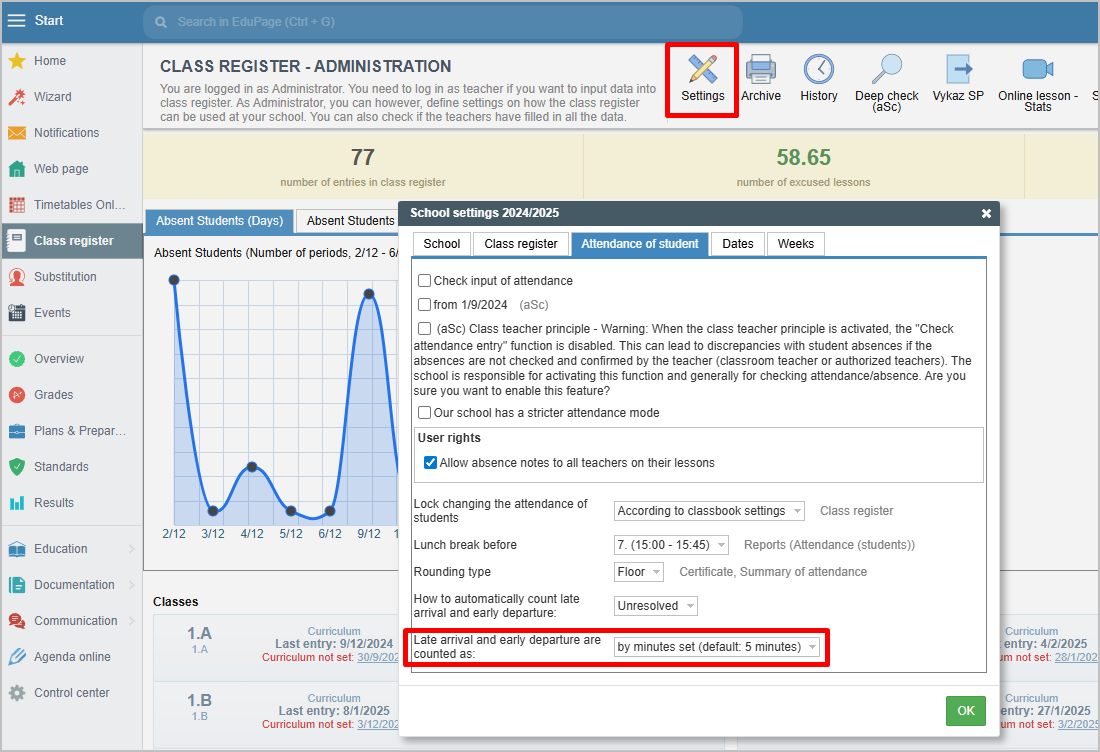
If you have already calculated classification statistics or generated report cards, you need to recalculate them after making this change — including student attendance.
I don’t use the Class Book, I want to enter summary attendance
More guides: Certificates