España
  Francais
  Polish
  Čeština
  Greek
Greek  Romanian
  Arabic
  Português
  Indonesian
  Croatian
  Serbia
  Farsi
Farsi  Mongolian
  Georgia
  Azerbaijani
  Thai
Thai  Turkish
  Magyar
 Copy duties


If the timetable changes during the school year, you can modify all duties and overtime assignments configured in the Substitutions module to match the new timetable. However, if you want to keep the existing settings and continue using them with the new timetable, you do not need to set everything up again. Simply copy the existing settings and make only the necessary adjustments.
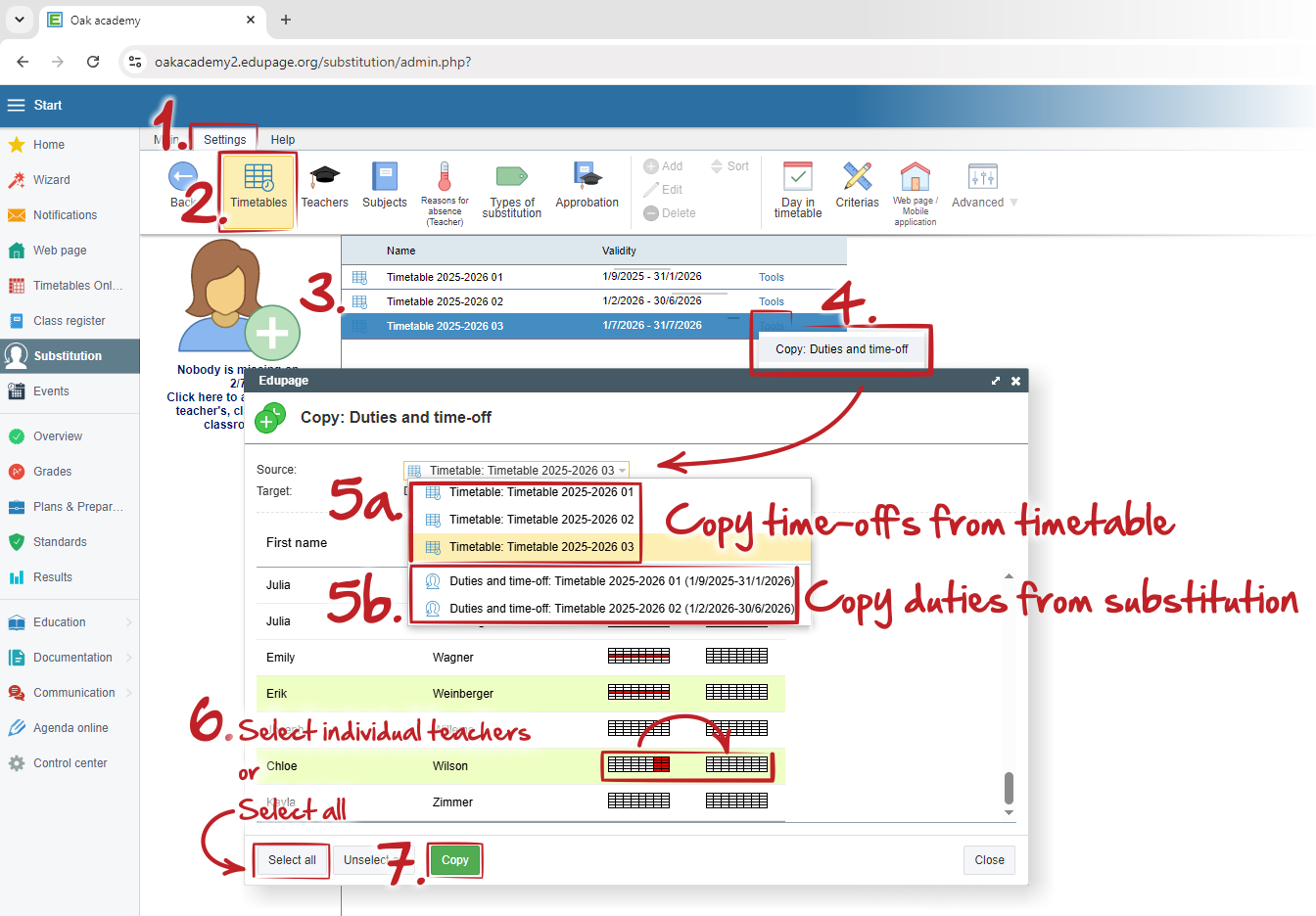
On the "Settings (1.)" tab, click "Timetables (2.)" and select the timetable (3.) to which you want to copy the duties. In the selected timetable row, click "Tools" - "Copy Duties and Time Off" (4.). In the dialog window, choose whether you want to copy blocked positions set by the teacher in the timetable using "Time Off" (5a.), or duties and overtime assignments configured in the Substitutions module during the previous timetable periods (5b.).
You can copy duties and time off for individual teachers (select them in the list using the standard "Shift" and "Ctrl" keys), or for all teachers at once by clicking "Select All" (6.).
Confirm your selection by clicking "Copy" (7.).